System in Analysis
The complete example code is available
here.
The mechanical powertrain to be studied is the one described in the
5 - DC Motor PWM Control
example.
In that example, the motor is controlled in order to keep the electric
current absorption below a threshold and to make the gear 6 reach a
specific final position and stay there.
After this simulation, we want to run a second simulation step, starting
from the results of the first step. In this second step, the motor is
still controlled in order to keep the current absorption below a
threshold and to make the gear 6 reach another specific final
position.
In order to analyze these steps, we need to concatenate two different
simulation.
Second Step Model Set Up
After running the first step simulation, we can prepare the motor controls for the second step by setting up the electric current absorption limit to 2 A and the second target position for the gear 6 to 60 rotations from the reference position:
start_2 = StartLimitCurrent(
    encoder=encoder,
    tachometer=tachometer,
    motor=motor,
    limit_electric_current=Current(2, 'A'),
    target_angular_position=AngularPosition(50, 'rot')
)

reach_position_2 = ReachAngularPosition(
    encoder=encoder,
    powertrain=powertrain,
    target_angular_position=AngularPosition(60, 'rot'),
    braking_angle=Angle(10, 'rot')
)

motor_control_2 = PWMControl(powertrain=powertrain)
motor_control_2.add_rule(rule=start_2)
motor_control_2.add_rule(rule=reach_position_2)
Simulation Set Up
It is important to not reset the previous results, since we want to concatenate the new simulation results to these; so we only need to update the solver simulation parameters with the new motor control:
solver.run(
    time_discretization=TimeInterval(0.5, 'sec'),
    simulation_time=TimeInterval(100, 'sec'),
    motor_control=motor_control_2
)
The remaining set-ups of the model stay the same.
Results Analysis
We can get the updated plot with the same code:
powertrain.plot(
    figsize=(8, 10),
    elements=['motor', 'gear 6'],
    angular_position_unit='rot',
    torque_unit='mNm',
    variables=[
        'angular position',
        'angular speed',
        'angular acceleration',
        'driving torque',
        'load torque',
        'torque',
        'electric current',
        'pwm'
    ]
)
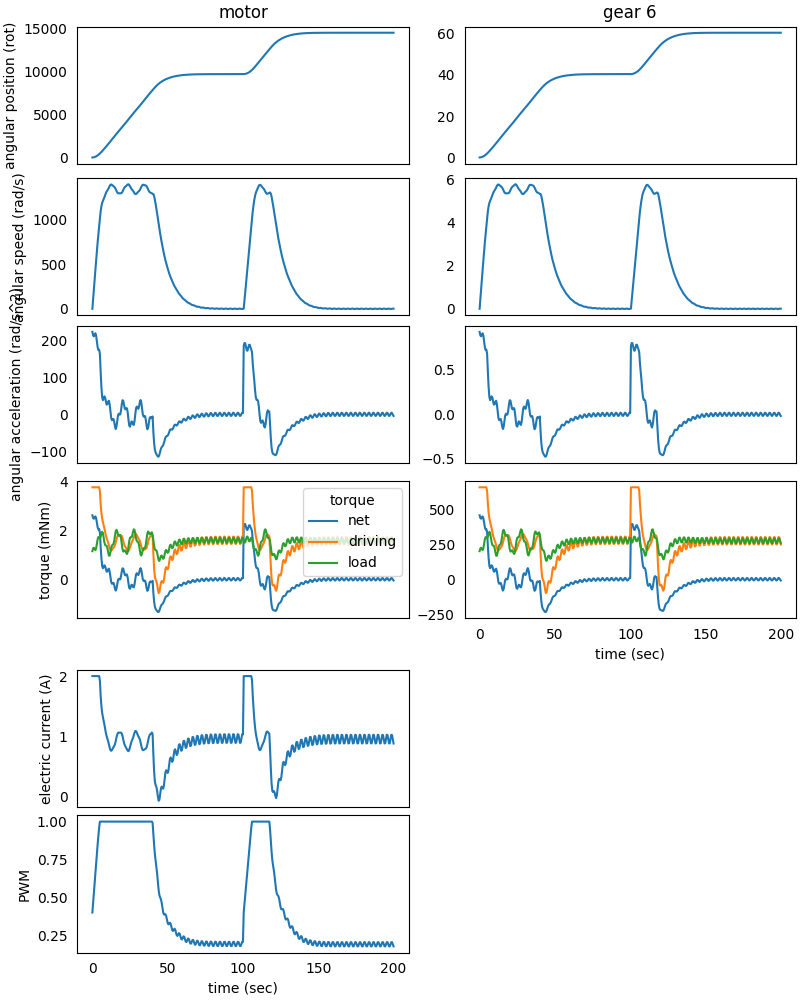
We can see the results of the first simulation up until 100 seconds from
the start, where the powertrain starts up and make the gear 6 reach
the destination at 40 rotations from the reference position, while
keeping the motor electric current absorption below 2 A.
From 100 seconds up to the end, we can see the results from the second
simulation, where the powertrain starts up again in order to make the
gear 6 reach the second destination at 60 rotations from the reference
position and still keeping the motor electric current absorption below
2 A.
The second step of the simulation depends on the first one only by the
powertrain elements initial conditions (positions, speeds and
accelerations); so the external load can be changed and also the solver
parameters, like the simulation time and discretization.